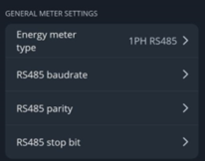
Note: Energy meter parameters should match EVSE default parameters.
RS485 parameter
EVSE default parameter value (configurable in mobile app)
Modbus adress
0-100*
Baud rate
9600
Parity
None
Stop bits
1
Entes meter factory default address is set by the last two digits of the serial number.
How to configure Smart energy meter in mobile application
Note: Users could use two meters with different addresses. Additionally, there will be settings for these energy meters in the installer menu (these settings are the same for both energy meters).
1. Make sure you have updated mobile application and firmware version of the charger to the latest. (Firmware and iOS / Android).
2. Go to installer menu in your application and set general parameters from table above: