
Carlo Gavazzi settings
Main Page > Main Page EVC2 > Smart energy meter mastersheet > Carlo Gavazzi settings
RS-485 parameters for Carlo Gavazzi series 1, 3 and 5
Note: The energy meter's parameters must match the EVSE (charger) parameters. The default values are listed below.
| RS-485 parameter | EVSE (charger) default value (configurable in the app) |
|---|---|
| Modbus address | 1 |
| Baud rate | 9600 |
| Parity | None |
| Stop bits | 1 |
Configuring the meter in the mobile application
Note: You can use two meters with different addresses. Both meters share the same settings in the installer menu.
- Make sure your charger firmware and application are updated to the latest version (see Release notes: Firmware and the app for iOS / Android).
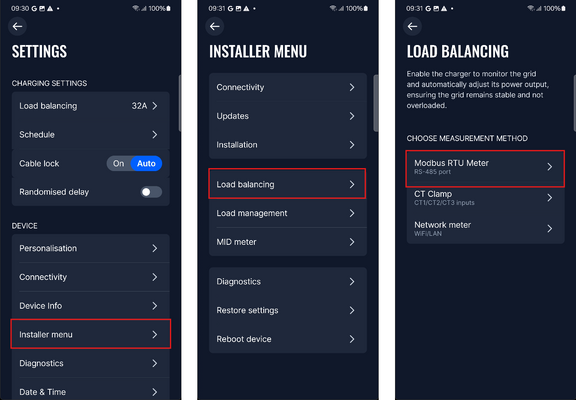
- Enter the Installer menu, select Load Balancing, then Modbus RTU.
- If the charger does not recognise the meter, go to Manual Setup and choose your meter model from the presets, or enter the values from the RS-485 parameters table manually.
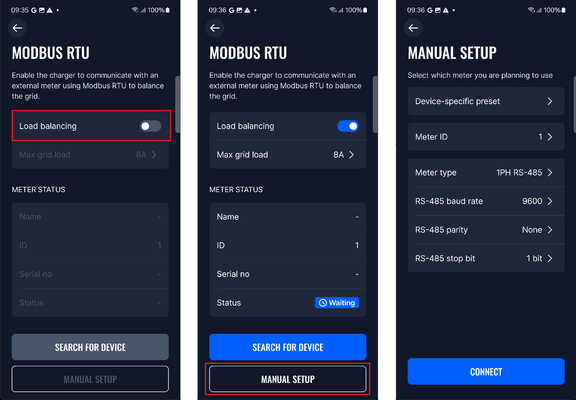


Once the meter is successfully configured, press Connect. You will receive a confirmation screen and the status will change. Possible statuses:
- Connected – the meter is configured correctly.
- Disconnected – a wrong parameter value is set on the charger, or the meter is not wired correctly.
- Wrong type – the meter configuration does not match the connected meter.
- Not supported – the connected meter is not compatible with the installation.
For detailed settings, refer to the energy meter's official documentation.